Copy Number Variant Grid
This page provides the ability to:
- Sort variants by Tier
- Review the copy number variants identified by DRAGEN CNV as part of the Genomics England Rare Disease Pipeline
- Review additional annotations and linkouts to external resources for each variant (see CNV Grid Guide below for further details)
- Assign an ACGS/ACMG classification to a variant, including selecting a contribution to phenotype, validation details, and adding a comment (see the recording interpretation page)
- Exclude a variant, with reasoning and comment (see the recording interpretation page)
- See a history log of interpretation actions
N.B. Tiered CNVs now display as 1/2 instead of A/B. Cases processed by the pipeline prior to the 4.3 RDDSS release will continue to display as Tier A / Tier B instead of Tier 1 / Tier 2. Please see the limitations page for further details.
N.B The RDDSS supports cases with SNVs that were processed since release 4.0, CNVs that were processed since release 4.2, and cases with Tiered STRs that were processed since release 4.3. Any cases that do not fit these criteria are not supported by the product, therefore it will not be possible to analyse them in the RDDSS, and alternative existing systems should be utilised to analyse the case.
CNV grid guide
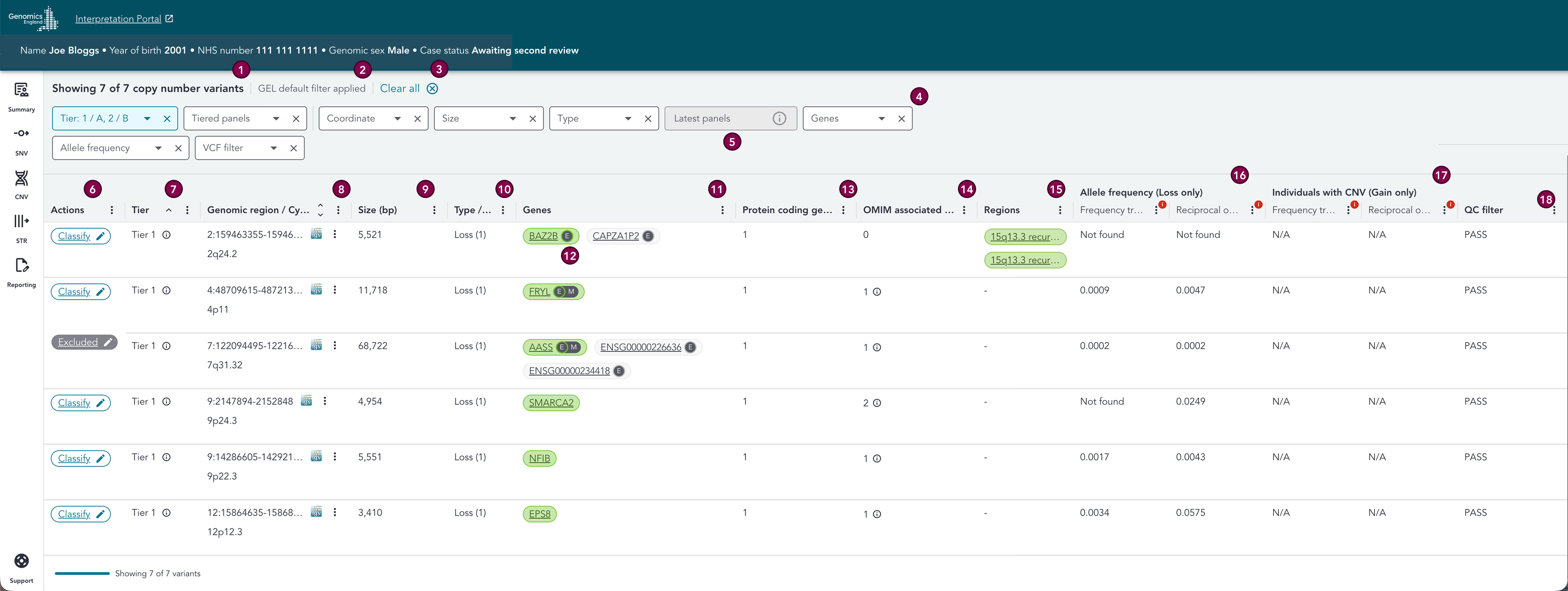
The order of columns in the CNV grid can be changed using the column headers. This will persist when you navigate around the case, so you can click onto a different page and come back to the CNV grid and your column order will remain intact. Please note however, that should you refresh the page, open the case in a new tab, or log out (/be logged out of) the system then log back in again and reopen the same case, then the column order will reset back to the default.
20 variants are shown by default, and more are loaded dynamically when scrolling to the bottom of the page.
Please use the below key in conjunction with the below sections to learn more about the columns in the variant grid.
Key
| # | Section | Description |
|---|---|---|
| 1 | Variant count | Summarises the number of variants currently displayed in the grid, and the total number of variants matching the selected filters. |
| 2 | Filter status | Denotes whether filters have been applied or there were no filters applied at all. GEL default filter applied indicates that the default set of filters is active, Custom filters applied indicates that an alternative combination of filters is active, No filters applied denotes that no filters are active. |
| 3 | Clear all | Click to remove all applied filters, including the GEL defaults. After clearing, filters can be reset to default using the Reset to default button. |
| 4 | Filters | Filter drop-downs can be used to apply various filters to the variant list. GEL default filters are automatically applied. See the Filters page for further details. |
| 5 | Incompatible filters | Some combinations of filters are incompatible due to the differing sources of the data meaning that it would be misleading to allow them to be used in combination. For further details, see the Filters combinations section on the filters page for further details. |
| 6 | Actions | A Classify button which can be clicked to open the classification drawer, and changes to display the classification of the variant once it has been assigned (for further details see the recording interpretation page). |
| 7 | Tier | This can be Tier A, Tier B, Tier Null, or "-" for untiered variants or variants that do not fall within a gene. For further details, please visit the Tier section below. |
| 8 | Genomic region / Cytoband | The genomic region and cytoband of the variants, with a button which displays a linkout to IGV (for read depth investigation). There is also a button that opens a menu containing further links to external databases and resources (DECIPHER (browser), gnomAD CNV, gnomAD SV, UCSC and DGV) for the variant, and a button to copy the variant coordinates in Alamut format. |
| 9 | Size (bp) | Length of the copy number variant in base pairs. |
| 10 | Type / Copy number | The type of the copy number variant. Loss (deletion CNV) or Gain (duplication CNV). The copy number state is indicated by the number in brackets next to the type. |
| 11 | Genes | HGNC gene symbol(s) which the variant affects. We show the first four affected genes (additional genes are indicated with a "+n" pill, with n being the number of genes), with green genes always displayed first. Clicking on any gene pill (or +n pill) will open the gene overlay (multi-gene overlay by default). For further details, please visit the genes section below. |
| 12 | Gene colour and exon overlap | Genes in Tiered variants are coloured green according to their PanelApp green gene status. For further details, please visit the genes section below. The E symbol in the gene pill represents that the CNV has exonic overlap with at least one transcript for that gene. If that transcript is also a MANE transcript (MANE Select or MANE Plus Clinical), then we also see a M symbol next to the E. Please note, ±2 kb padding is applied to the CNV during annotation. For further details, please visit the CellBase annotations section below. |
| 13 | Protein coding genes | The number of genes that the CNV affects with that have at least one transcript with a protein coding biotype. |
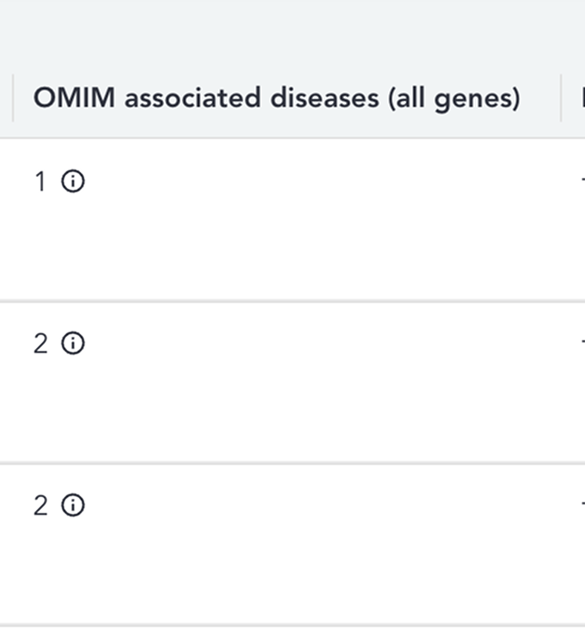
| 14 | OMIM associated diseases | Count of associated diseases for the gene in OMIM. For further details, please visit the OMIM section below. |
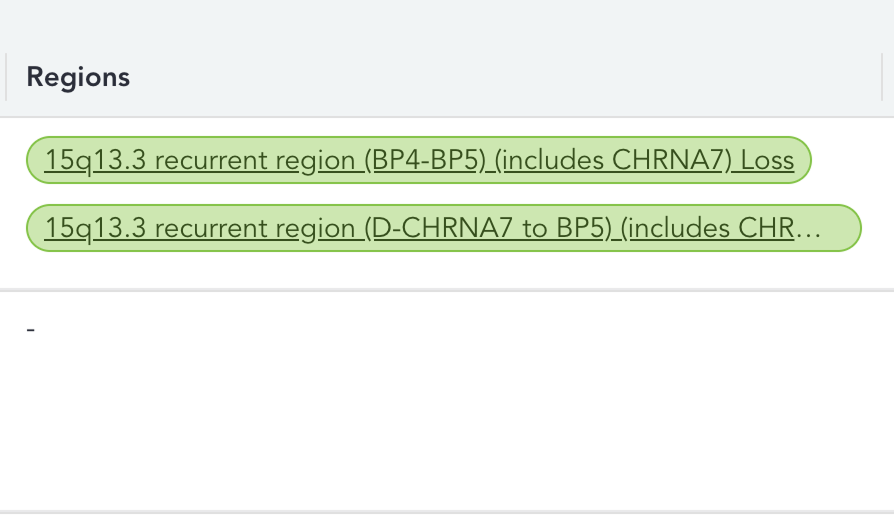
| 15 | Regions | PanelApp ISCA regions the CNV affects. The region pill is coloured green according to its PanelApp green gene status. For further details, please visit the regions section below. |
| 16 | Allele frequency (Loss only) | Frequency track - Displays the proportion of individuals in a reference dataset who carry a copy loss CNV that reciprocally overlaps the query CNV, to 4 decimal places. Reciprocal overlap - Calculated based on CNVs that overlap the query CNV by at least 50% in both directions. These columns will only be populated where the CNV is a copy loss variant - for copy gain variants, N/A will be visible. The frequency dataset only contains PASS variants. For further details, please visit the allele frequency / individuals with CNV section below. |
| 17 | Individuals with CNV (Gain only) | Frequency track - Displays the proportion of indivduals in a reference dataset who carry a copy gain CNV that reciprocally overlaps the query CNV, to 4 decimal places. Reciprocal overlap - Calculated based on CNVs that overlap the query CNV by at least 50% in both directions. These columns will only be populated where the CNV is a copy gain variant - for copy loss variants, N/A will be visible. The frequency dataset only contains PASS variants. For further details, please visit the allele frequency / individuals with CNV section below. |
| 18 | QC filter | Indicates whether the variant passed QC filters applied during the analysis. Obtained from the VCF file. |
Sorting
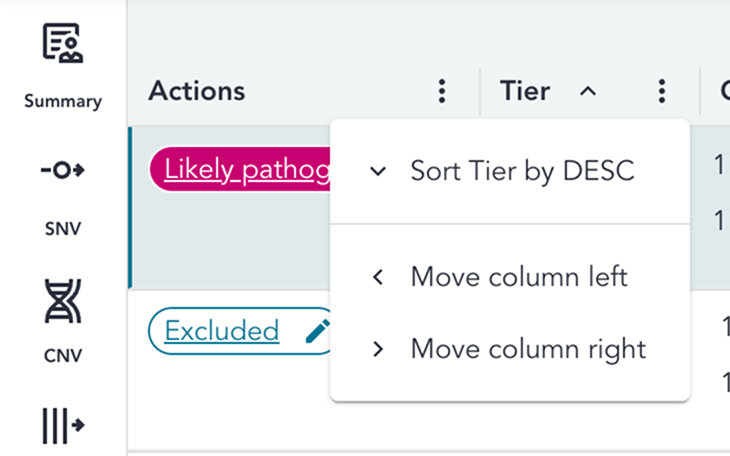
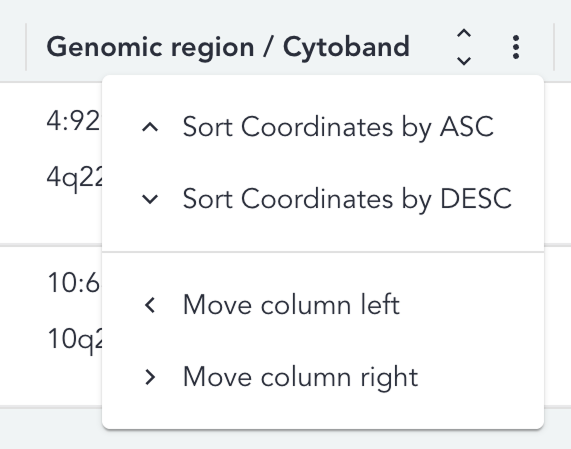
By default, all variants are sorted by Tier ascending and by variant coordinates ascending. Variants can be sorted by Tier or coordinates ascending or descending,by using the arrow icon or menu in the column headers.
Please note, sorting by Tier or coordinates are independent of one another - if you apply a sort on one after sorting on the other, a combination sort will not apply - the sort will simply be overruled.
Tier
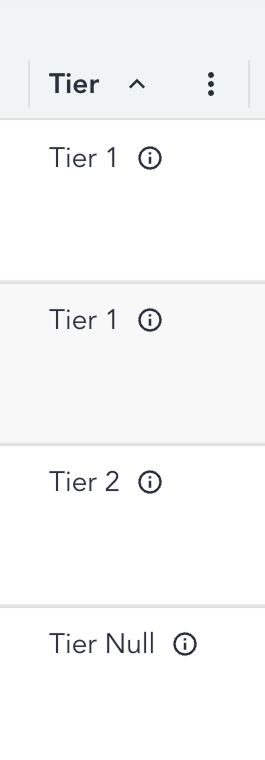
This can be Tier A, Tier B, Tier Null, or "-" for untiered variants or variants that do not fall within a gene. When clicking on the tooltip next to the Tier, the Tier overlay opens.
For details on how to sort by Tier, please visit the sorting section.
Tier overlay
The Tier overlay displays details about the Genomics England Tiering outcome for the variant.
The highest Tier assigned to the variant and the clinical indication for the proband are displayed at the top of the overlay.
Below this we see all prioritisation results (previously known as Report Events) for the variant displayed in a table; the entity and panel considered by Tiering as part of the finding are displayed per prioritisation result.
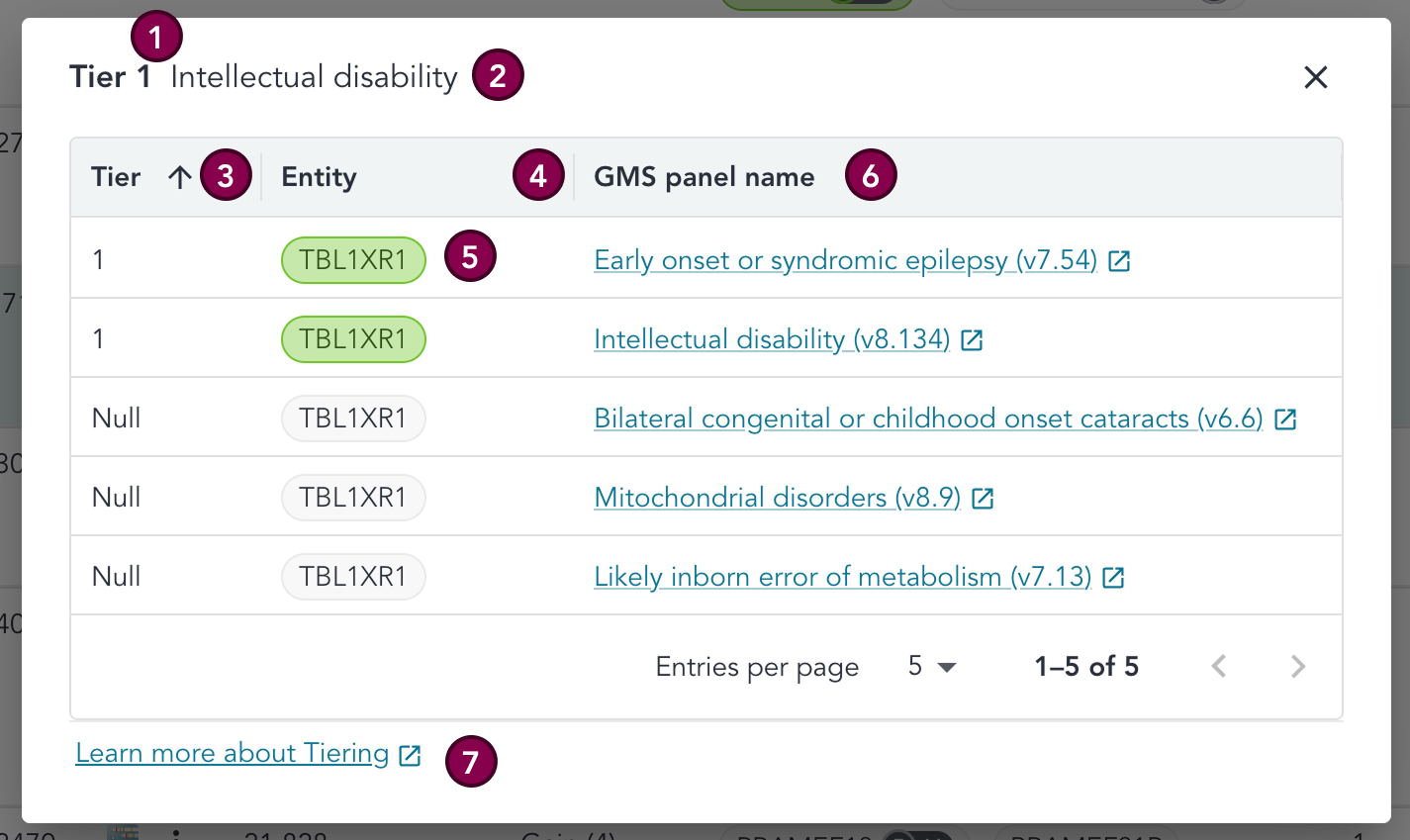
Key
| # | Section | Description |
|---|---|---|
| 1 | Highest Tier | The highest Tier assigned to the variant by Genomics England Rare Disease Tiering. |
| 2 | Clinical indication | The clinical indication for the proband. |
| 3 | Tier | Tier assigned by Genomics England Rare Disease Tiering. |
| 4 | Entity | Gene or region affected by the CNV for the Genomics England Rare Disease Tiering result. |
| 5 | Entity colour | The entity pill is coloured green when the entity is green in at least one PanelApp panel (/superpanel) of the most recent version at the time of case ingestion, where that panel is also a panel that has been applied to the case. |
| 6 | GMS panel name | Name of the GMS panel applied to the patient that is associated with the Genomics England Rare Disease Tiering result, with a link to the GMS signed off PanelApp panel. |
| 7 | Links to GEL Rare Disease Genome Analysis Guide | Links to the relevant pages in the Genomics England Rare Disease Genome Analysis Guide. |
Genes
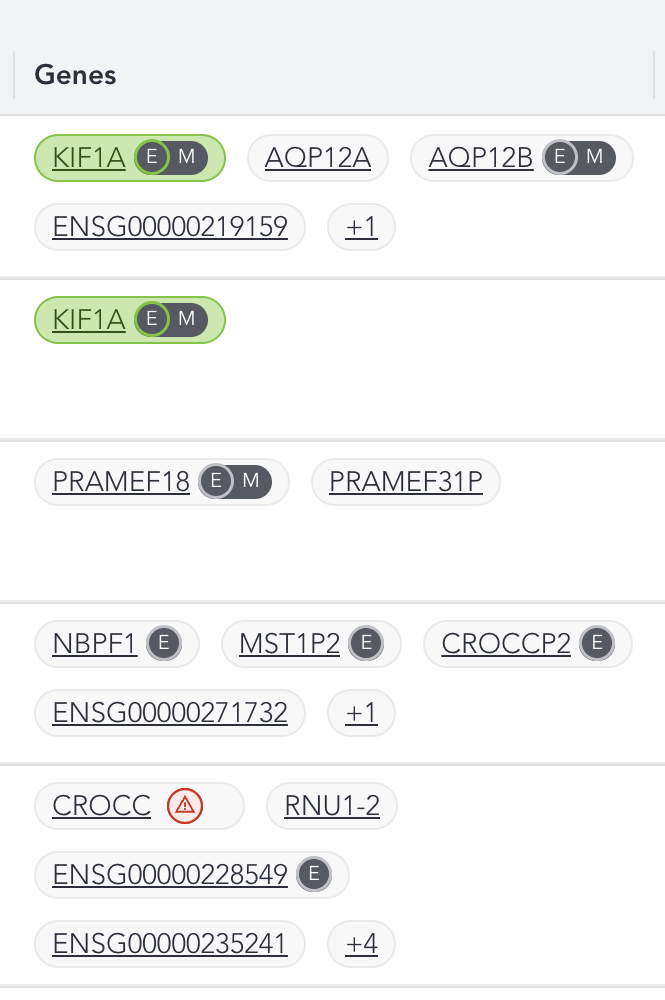
HGNC gene symbol(s) which the variant affects; affected genes are displayed in the grid. This is different to the behaviour in the SNV grid - here we display the first 4 genes, with green genes always displayed first, and a +n pill to represent the number of further genes affected by the CNV. Those that are green in a PanelApp panel are displayed first.
Clicking on the gene, or +n in the Genes column opens the gene overlay.
Gene colour
Green genes are always displayed first and are denoted by the gene pill being coloured green. If any of the further genes represented by the +n pill are also green in a PanelApp panel, then the +n pill will also be displayed green.
Multi gene overlay
The multi-gene overlay contains the key information for each gene affected by the CNV, in a single table. Those genes that are green in PanelApp are ordered first in the table. More detailed information for each individual gene is accessible in the single gene overlay.
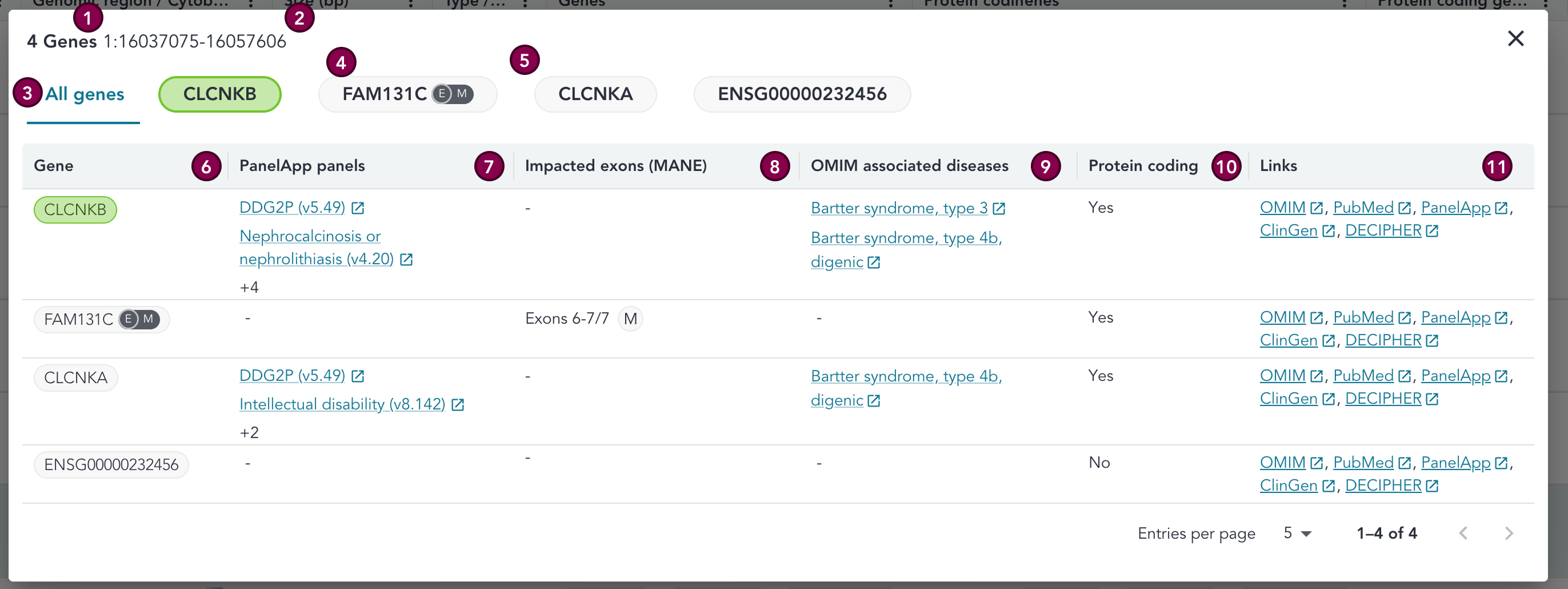
Key
| # | Section | Description |
|---|---|---|
| 1 | Total number of genes | Total number of genes that the CNV affects. |
| 2 | Variant coordinates | Coordinates for the CNV. |
| 3 | Gene name / header | The gene names can be seen along the top of the overlay - these are clickable, with each tab displaying the relevant information for that gene. Green genes are always ordered first. |
| 4 | Gene colour | The gene pill is coloured green when the gene is green in at least one PanelApp panel of the most recent version at the time of case ingestion. |
| 5 | Exon overlap | E symbol in the gene pill represents that the CNV has exonic overlap with at least one transcript for that gene. If that transcript is also a MANE transcript (MANE Select or MANE Plus Clinical), then we also see a M symbol next to the E. |
| 6 | Gene | HGNC gene symbol which the variant affects. Gene is coloured according to PanelApp green gene status in the same way as the gene symbols in the header. |
| 7 | PanelApp panels | PanelApp panels for the gene (including version and a link-out to the PanelApp page for the panel). If the gene is present in no PanelApp panels, then a - is displayed. A maximum of 2 PanelApp panels are displayed in the grid. If the gene is in any further PanelApp panels, the number of additional panels is denoted by +n. (N.B. This count only includes panels, not superpanels) |
| 8 | Impacted exons (MANE) | Displays the exons that are overlapped by the CNV for any MANE transcripts for that gene. A M or M+ icon will be displayed next to the exon overlap to denote whether the transcript is MANE Select or MANE Plus Clinical. If no exons are overlapped in MANE transcripts, a - will be displayed. |
| 9 | OMIM associated diseases | Displays any diseases associated with the gene in OMIM, and a link-out to the OMIM page for each disease. A maximum of 2 associated diseases are displayed in the grid. If the gene is associated with more than 2 diseases in OMIM, the number of additional diseases is denoted by +n. |
| 10 | Protein coding | Denotes whether the gene is protein coding (i.e. has any transcript with a biotype that is protein coding). |
| 11 | Links | Linkouts to external resources and databases for the gene (OMIM, PubMed, PanelApp, ClinGen, DECIPHER). |
Single gene overlay
The gene overlay which displays relevant information for the gene.
This includes Ensembl IDs for the gene and transcripts, PanelApp panels the gene is present in, OMIM associated diseases for the gene, the c. HGVS nomenclature for the CDS change, the p. HGVS nomenclature for the protein change, and links to external resources for the gene (OMIM, PubMed, PanelApp, ClinGen, DECIPHER). All variants are annotated with PanelApp panels upon case ingestion, with the underlying dataset used for annotation updated with the most recent PanelApp data every hour (data is static once the case is ingested into the RDDSS). For further details, see the annotations page.
The gene names can be seen along the top of the overlay; a variant can be associated with more than one gene. Gene names are clickable, with each page displaying the relevant information for that gene.
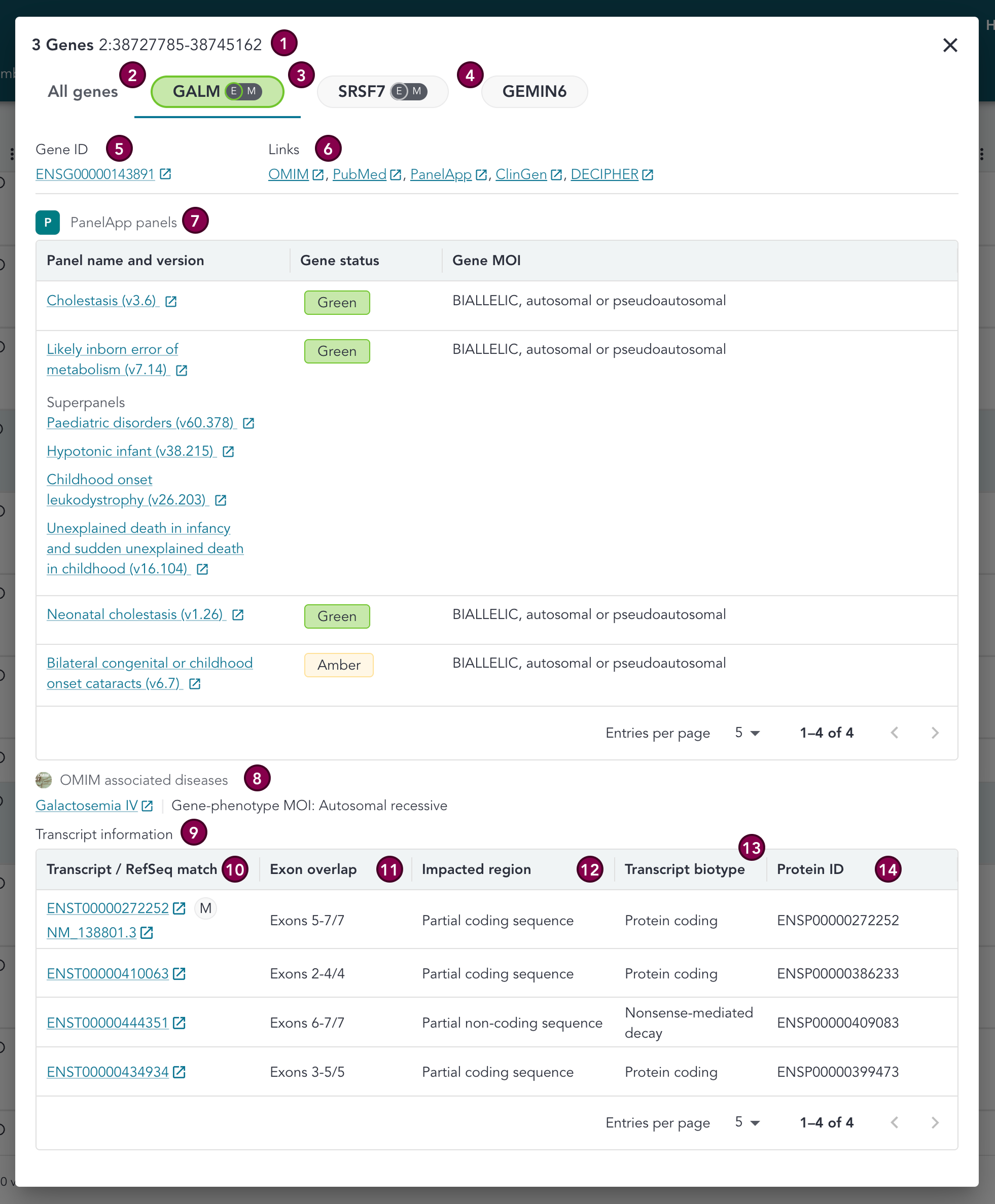
Key
| # | Section | Description |
|---|---|---|
| 1 | Gene count, and variant | Header consisting of a count of the associated genes, and the variant coordinates |
| 2 | Gene tabs | Tabs for each gene the variant is associated with, plus a tab for the multi-gene display. These are clickable, with each tab displaying the relevant information for that gene. |
| 3 | Gene colour | The gene pill is coloured green when the gene is green in at least one PanelApp panel of the most recent version at the time of case ingestion. |
| 4 | Exon overlap | E symbol in the gene pill represents that the CNV has exonic overlap with at least one transcript for that gene. If that transcript is also a MANE transcript (MANE Select or MANE Plus Clinical), then we also see a M symbol next to the E. |
| 5 | Gene ID | Ensembl gene ID. |
| 6 | Links | Linkouts to external resources and databases for the gene (OMIM, PubMed, PanelApp, ClinGen, DECIPHER). |
| 7 | PanelApp panels | This section displays the PanelApp panels for the gene (including version and a link-out to the PanelApp page for the panel). If the panel is present in any superpanels, these are listed within the row under a Superpanels header. For each panel, we see the gene rating (green, amber, red), and PanelApp's MOI for the gene. If there is no MOI recorded in PanelApp, then this will be displayed as Unknown. If the gene has been removed from the panel in the most recent version at the time of case ingestion, then a '-' is displayed in the Gene status column, and the Gene MOI will be displayed as Unknown. If the gene is present in no PanelApp panels, then None is displayed in place of all data. |
| 8 | OMIM associated diseases | Displays any diseases associated with the gene in OMIM, as well as the gene-phenotype mode of inheritance, and a link-out to the OMIM page for each disease. Where there is more than 1 associated disease the data is displayed in a table, and pages of the table can be navigated between using the arrow buttons. |
| 9 | Transcript information | Table containing details of transcripts for that gene which overlap the variant. A '-' in the table indicates that this data is not available for the transcript. Transcripts are ordered by the following priority: MANE Select, MANE Plus Clinical. Any transcripts that do not match these criteria are displayed unordered. |
| 10 | Transcript / RefSeq Match | Ensembl transcript ID is provided for each transcript, and RefSeq NM number is provided for MANE transcripts. These provide linkouts to the respective transcript pages. RefSeq transcript IDs are only provided for MANE transcripts, as only these guarantee 100% sequence identity between the respective Ensembl and RefSeq transcript IDs. If the transcript is MANE then a flag will be displayed (M for MANE Select and M+ for MANE Plus Clinical). If more than 5 transcripts exist, then these can be navigated through using the arrows at the bottom of the table. |
| 11 | Exon overlap | The specific exons in that transcript that are overlapped by the CNV. |
| 12 | Impacted region | The region of the transcript that is impacted by the CNV: Full transcript, Partial coding sequence, Partial non-coding sequence, Not applicable. |
| 13 | Transcript biotype | Indicates the type of transcript; this can indicate whether it is coding or non-coding and its role. |
| 14 | Protein ID (Ensembl ID) | Ensembl ID for the protein produced by the transcript. |
OMIM associated diseases
There is a count of associated diseases in OMIM for each gene visible in the row for the variant.
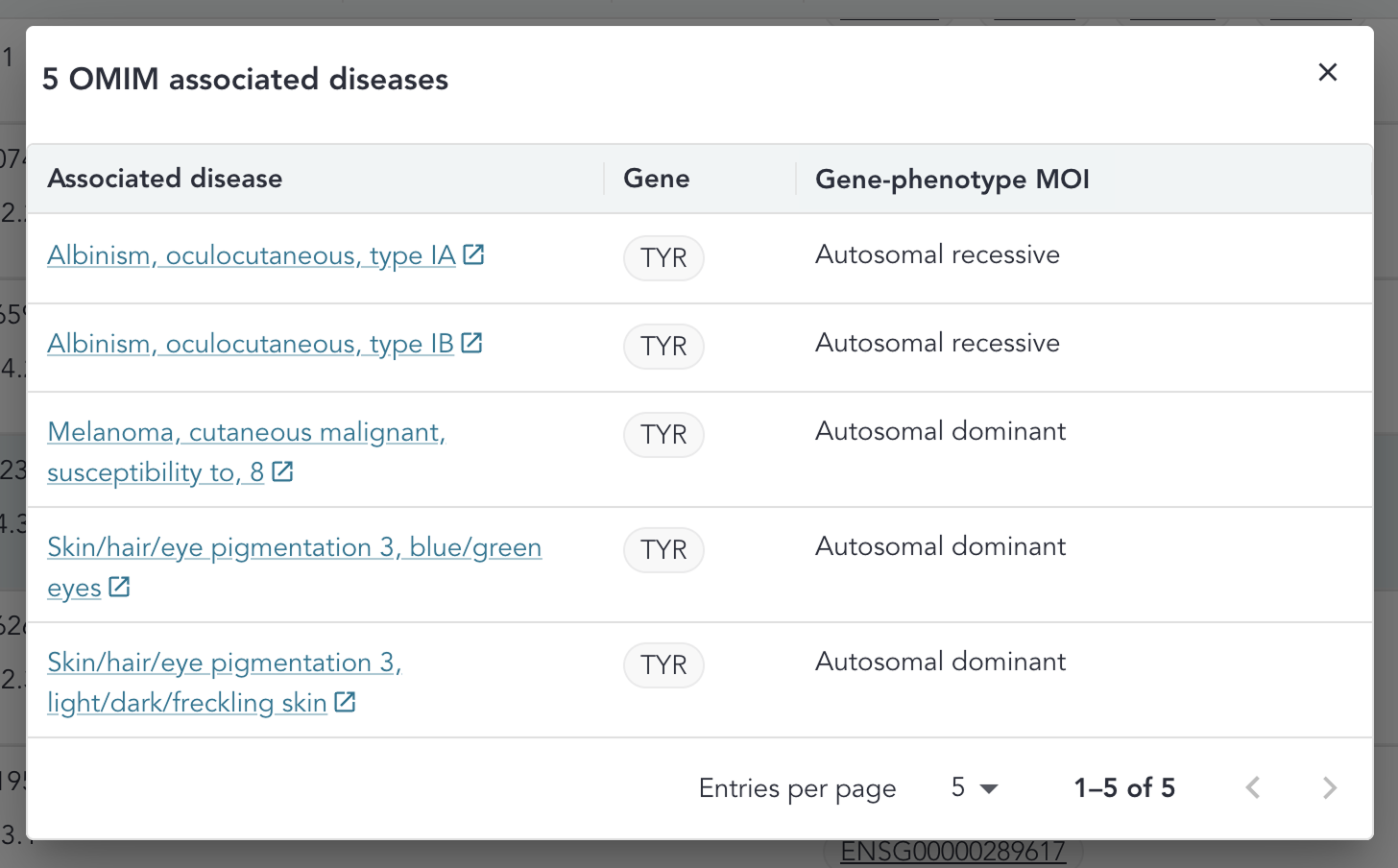
Clicking the i icon opens the OMIM overlay. Different from the SNV grid, the OMIM overlay in the CNV grid displays all gene-disease associations for the variant, across all genes associated with the variant.
OMIM data is annotated at the point of case ingestion, with the underlying data used for annotation being updated with each RDDSS release. For further details, see the annotations page.
OMIM overlay
The OMIM overlay displays each disease associated with any gene in OMIM that is associated with the variant, the gene-phenotype mode of inheritance, and a link-out to the OMIM page for each disease (N.B. this is different to the SNV overlay where the associations are displayed for a single gene only). If there is no mode of inheritance in OMIM for an associated disease then Unknown will be visible. The pages of the table can be navigated between using the arrow buttons. The associated diseases are ordered with those associated with a green gene coming first, and then ordered alphabetically by associated disease name.
Where a disease is associated with multiple genes for that variant, multiple genes will be displayed next to that disease in the Gene column.
Regions
PanelApp ISCA regions the CNV affects. Where the CNV does not overlap a region, a - is displayed.
Region colour
The region pill is coloured green when the region is green in at least one PanelApp panel of the most recent version at the time of case ingestion.
Region overlay
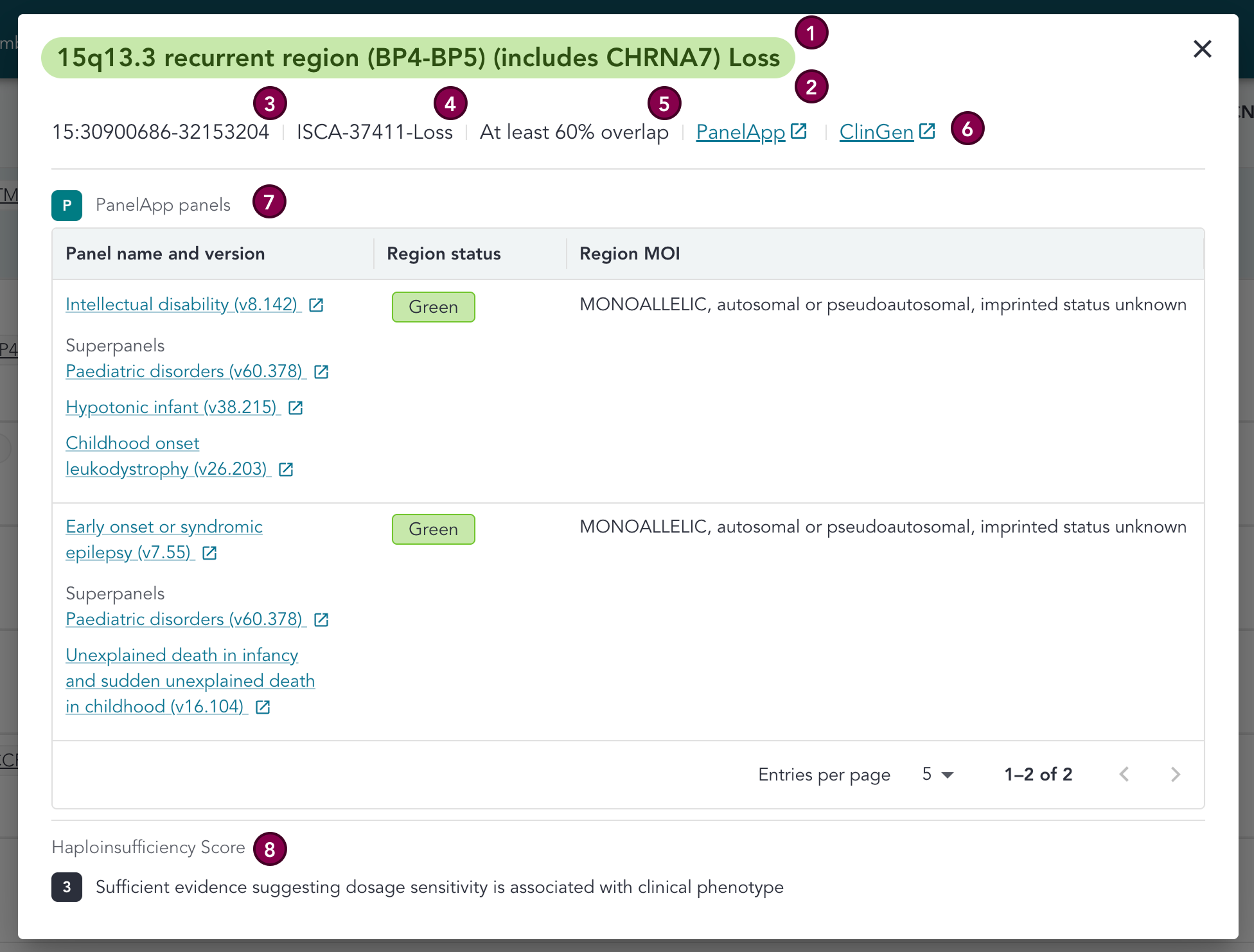
The region overlay which displays relevant information for the region. This includes the ISCA region name, the required percentage of overlap, PanelApp panels the region is present in, and Haploinsufficiency or Triplosensitivity Score, as well as link-outs to PanelApp and ClinGen for the region. The data used for PanelApp panel annotation is updated every hour (data is static once the case is ingested into the RDDSS).
There is a region overlay per region - if the CNV affects multiple regions, the overlay for one would need to be closed in order to view the overlay for the other.
Key
| # | Section | Description |
|---|---|---|
| 1 | Region name / header | The descriptive, cytogenetic name for the region can be seen along the top of the overlay. A variant can be associated with more than one region, but to see information for a second region the overlay should be exited and the other region name clicked on. |
| 2 | Region colour | The gene pill is coloured green when the gene is green in at least one PanelApp panel of the most recent version at the time of case ingestion. |
| 3 | Region coordinates | Coordinates for the region. |
| 4 | ClinGen ISCA region ID | ClinGen curated identifier for the region. |
| 5 | Required percentage overlap | The minimum percentage of the defined genomic region that needs to be covered by a CNV for it to be considered clinically significant. |
| 6 | Links | Linkouts to external resources and databases for the region (PanelApp and ClinGen). |
| 7 | PanelApp panels | This section displays the PanelApp panels for the region (including version and a link-out to the PanelApp page for the panel). If the panel is present in any superpanels, these are listed within the row under a Superpanels header. For each panel, we see the region status (green, amber, red), and PanelApp's MOI for the region. If there is no MOI recorded in PanelApp, then this will be displayed as Unknown. If the region has been removed from the panel in the most recent version at the time of case ingestion, then a '-' is displayed in the Region status column, and the Region MOI will be displayed as Unknown. |
| 8 | Haploinsufficiency / triplosensitivity score | The score for the region, as provided by PanelApp. Possible options for haploinsufficiency are: 3 (Sufficient evidence suggesting dosage sensitivity is associated with clinical phenotype) or 30 (Gene associated with autosomal recessive phenotype). Possible options for triplosensitivity are: 2 (Emerging evidence suggesting dosage sensitivity is associated with clinical phenotype), 3 (Sufficient evidence suggesting dosage sensitivity is associated with clinical phenotype). |
Allele frequency (Loss only), and individuals with CNV (Gain only)
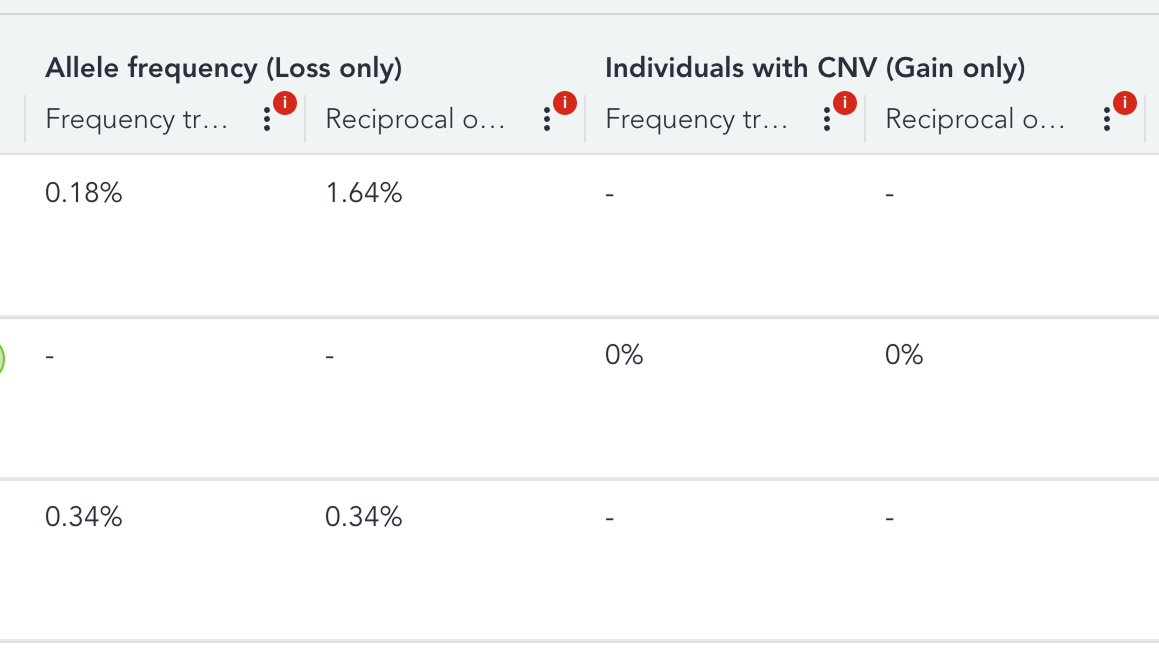
Frequency track displays the proportion of individuals in a reference dataset who carry a copy loss CNV that reciprocally overlaps the query CNV, to 4 decimal places. Reciprocal overlap is calculated based on CNVs that overlap the query CNV by at least 50% in both directions.
Frequency track and reciprocal overlap will be populated under the Allele frequency header where the CNV is a copy loss variant, whilst they will be populated under the Individuals with CNV header where the CNV is a copy gain variant.
Where frequency is 0, Not found will be displayed in the grid, and where frequency is less than 0.0001, < 0.0001 will be displayed in the grid. Where there is no frequency data, a dash will be displayed in the grid.
Non-PASS variants will always have a "-" displayed, because the GEL internal allele frequency dataset only contains PASS CNVs, therefore it is not appropriate to annotate allele frequency against non-PASS variants.
CNV frequency annotations may be unreliable for fragmented, or complex CNVs due to breakpoint and copy number uncertainty, and should be interpreted with caution. Please consult the pipeline documentation on CNV frequency annotation for further information".
In the case where there is no data for a PASS variant, a "-" will be displayed.
CellBase annotations
When annotating CNVs, CellBase applies ±2 kb padding to the CNV, which is intentional and is designed to account for uncertainty in CNV breakpoint coordinates.
Without this padding, a CNV close to an exon boundary could be annotated as intronic or non-coding even where the true breakpoint overlaps the exon. This could make a potentially relevant CNV less likely to be reviewed and introduces a risk of false-negative interpretation.
Applying padding prioritises sensitivity, at the cost of a small reduction in specificity. As a result, some CNVs close to exon boundaries may be labelled as exonic in the RDDSS even where the reported CNV coordinates do not directly overlap an exon in other resources such as DECIPHER.
Abbreviations
| Abbreviation | Definition |
|---|---|
| ACGS | Association for Clinical Genomic Science |
| ACMG | American College of Medical Genetics and Genomics |
| CDS | Coding DNA Sequence |
| CIP-API | Genomics England Clinical Interpretation API |
| CNV | Copy Number Variant |
| CVA | Clinical Variant Ark |
| EQ | Exit Questionnaire |
| RDDSS | Rare Disease Decision Support System |
| GEL | Genomics England |
| GMS | Genomic Medicine Service |
| GLH | Genomic Laboratory Hub |
| HGVS | Human Genome Variation Society |
| HTML | Hyper Text Markup Language |
| HSCN | Health and Social Care Network (N3) |
| IGV | Integrative Genomics Viewer |
| IB | Interpretation Browser |
| IP | Interpretation Portal |
| NGIS | National Genomics Informatics System |
| PID | Patient Identifiable Data |
| QC | Quality Control |
| SoF | Summary of Findings |
| SO | Sequence Ontology |
| SNV | Single Nucleotide Variant |
| SV | Structural Variant |
| TOMS | Test Order Management System |
| UAT | User Acceptance Testing |
| VCF | Variant Call Format File |
| VILs | Variant Interpretation Logs |
| WGS | Whole Genome Sequencing |