Case summary
Missing resources
Some case-level resources (e.g. panel coverage, BAF plots, Summary of Findings) and raw sequencing files (VCFs) for the case are not yet supported in the RDDSS, but will be in future. In the meantime, please continue to use the IP to review these resources.
PID
Non-NHS users are only able to view minimal patient information; patient sex, patient ID and Clinical Indication. Patient name, date of birth and NHS number are only visible to NHS users.
Opening a case from the IP navigates to the case summary page by default.
This page provides the ability to:
- View patient, case, clinical and family information
- View any case warnings displayed across the top of the page
- View a summary of the prioritised variant counts by variant type
- Link out to the SNV, CNV, and STR pages
- Check the versions of software and datasets used by the pipeline and for annotation in the RDDSS
- Check the release version of the RDDSS, in the product footer
Important: Cases with loci that are green in the applied panel(/s), but whose repeat sizes are missing due to insufficient data quality, are flagged in the case summary page with an alert banner. For these cases, consideration should be taken as to whether orthogonal testing is required
The following loci are green in the applied panel(s), but their repeat sizes are missing due to insufficient data quality
Case banners
Case warnings, pipeline flags, or case tags will appear at the top of the screen in a banner. If there aren’t any case warnings, flags or tags, there won’t be any shown on the case summary page.
There are three colours used for case banners:
- Red: These constitute critical warnings, which may mean that case analysis should not continue, for example withdrawal of consent from a single or multiple individuals
- Yellow: These are warnings, which constitute things that you should be aware of prior to commencing and whilst carrying out analysis of your case
- Blue: These are informational, for example indicating that the case is closed or you may not have permissions to view certain data or take certain actions
Case alerts
General case alerts cover case closed status, consent status, case permissions, and PID permissions alerts. For more details on these, see the info section below.



Case alerts
| Alert | Description |
|---|---|
| STR loci with no results | Some STR loci in applied panels have no results: The following loci are green in the applied panel(s), but their repeat sizes are missing or unreliable due to insufficient data quality: |
| Case ingested before non-PASS green STRs could be loaded | This case was ingested before non-PASS green STRs in the applied panel(s) were included in ingestion. Review the VCF directly to determine whether any non-PASS green STRs are present. |
| Case closed | This case has been added to CVA and a Summary of Findings has been created in the Interpretation Portal. You can view the details of the closed case here, but edits are not allowed. To make changes, re-open the case by changing its status back to In Progress. |
| Consent status | One or multiple individuals have changed their mind about consent for this test, please discuss next steps with the referring clinician. |
| Case permissions | You do not have the permissions to take actions, such as commenting, classifying and closing the case. Talk to an administrator if you want to make changes to this case. |
| PID permissions | You don't have the permission to view patient identifiable information with your current permissions. If you think this is wrong, please get in touch with the Service Desk. |
Pipeline flags
Flags may be added by the sequencing pipeline for a variety of reasons, including to highlight potential sequencing or variant-calling quality issues, identify discrepancies or uncertainties relating to reported and genetically inferred sex, or flag relevant genomic findings such as uniparental disomy (UPD). These warnings provide additional context that may be important for clinical interpretation and case review. Examples of these are displayed in the info section below. For further details, please refer to the Rare Disease Genome Analysis Guide.

Pipeline alerts
| Flag | Description |
|---|---|
| Low coverage | <95% of the autosomal genome covered at ≥15x calculated from reads with mapping quality >10 and >85x10^9 bases with Q≥30, after removing duplicate reads and overlapping bases after adaptor and quality trimming. |
| Saliva sample | Genome sequencing performed using DNA extracted from saliva. There is a risk of poorer quality sequencing data for saliva samples. |
| Unusual sex karyotype | At least one member of the family has a sex karyotype that is not XX or XY. |
| Incorrect or discordant sex karyotype | Reported karyotypic and phenotypic sex are discrepant but the karyotypic sex is supported by the sex inferred from the genomic data in at least one family member. |
| Inferred genetic and reported sex discordant | Reported sex is discrepant from the inferred genetic sex and the Disorders of Sex development panel has been applied. |
| Unknown phenotypic sex | Phenotypic sex is unknown for at least one member of a family. |
| Poor quality CNV calls | The majority of CNV calls in the proband are expected to be of poor quality. |
| Suspected poor quality CNV calls | An increased number of poor quality CNV calls is suspected. |
| Uniparental disomy | ddddddddd [mat|pat]UPDnn [i|h|m][c|p] Uniparental disomy detected. |
Case tags
Warning tags are added manually, for a number of reasons, to surface additional context that may need to be taken into account when working on the case. For examples, please see the info section below.
Case tags
| Tag | Description |
|---|---|
| Deviation | The case has required a deviation to progress through the pipeline, due to a technical issue or bug |
| Specific issue | The case is part of a wider group of cases affected by a particular issue, for example tagging of dWGS cases with low depth STRs |
Case header
The case header contains basic case information. Additional patient and case information can be found on the top right of the banner by clicking the respective drop down menus.

Key
| # | Section | Description |
|---|---|---|
| 1 | Interpretation Portal link-out | Opens the case in the IP in a new tab. |
| 2 | Name | Patient’s first and last name as captured from TOMS. |
| 3 | Year of birth | Patient’s year of birth as captured from TOMS. |
| 4 | NHS number | Patient’s NHS number as captured from TOMS. |
| 5 | Genomic sex | Patient's genomic sex as reported by the Genomics England Rare Disease pipeline. |
| 6 | Case status | Interpretation status of the case within the RDDSS, e.g. whether the analysis is in progress or pending secondary review, etc. See the case status page for more info. |
| 7 | HPO terms | Click here to view the present HPO terms for individuals in the case. |
| 8 | Case info | Click here for case information. |
| 9 | Current user | Initials of current user. When clicked on, displays the current user's name, email and a log out button. |
HPO terms drop-down
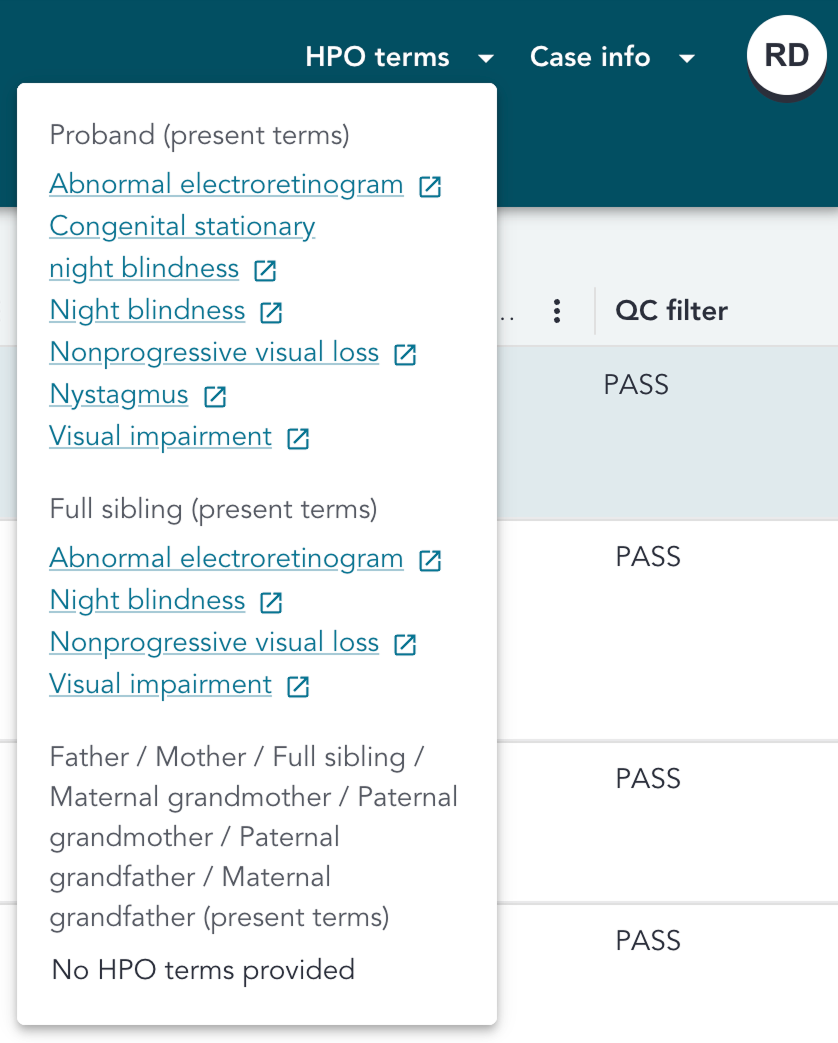
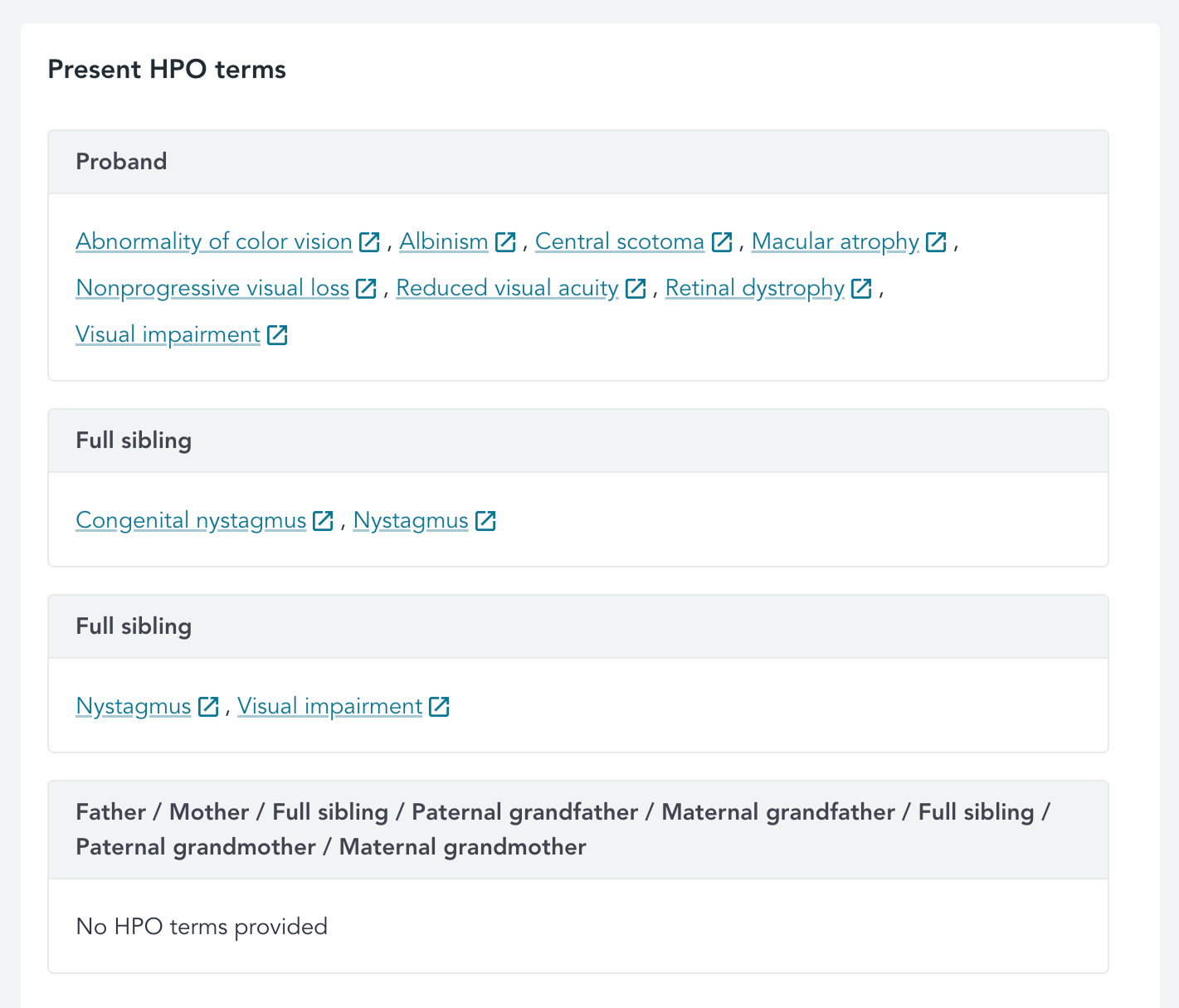
This header drop-down displays the present HPO terms for each individual in the case. The present HPO terms for the proband are always displayed first, followed by headers and HPO terms for other individuals with present HPO terms. Each HPO term has a link-out to its page on the HPO website.
Any individuals with no present terms provided are grouped together, with No HPO terms provided displayed.
Currently, we do not display terms that were marked as absent or unknown in the RDDSS.
Case info drop-down
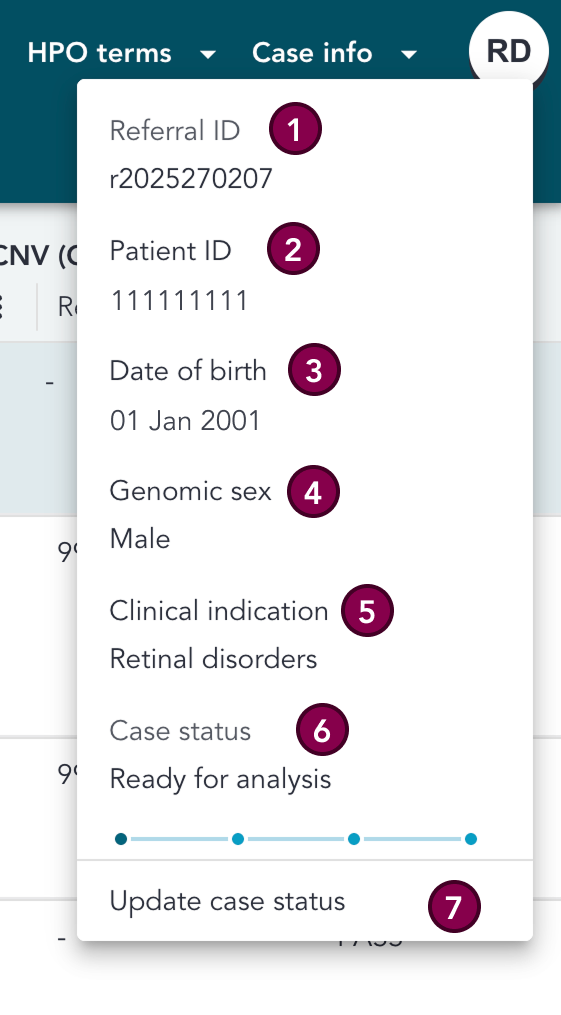
This header drop-down displays the minimal set of information for the patient.
For information on the RDDSS case status, please see the case status page.
Key
| # | Section | Description |
|---|---|---|
| 1 | Referral ID | The Referral ID for the patient |
| 2 | Patient ID | The patient ID as captured from TOMS. |
| 3 | Date of birth | Patient date of birth as captured from TOMS. |
| 4 | Genomic sex | Patient's genomic sex as reported by the Genomics England Rare Disease pipeline. |
| 5 | Clinical indication | Patient clinical indication from the Test Directory, defined during the test order. |
| 6 | Case status | Interpretation Status of the case in the RDDSS, e.g. whether the analysis is in progress. See the case status page for more info |
| 7 | Update case status | This button can be used to update the RDDSS case status (for more details, see the case status page) |
Patient information
This section contains patient-specific details.
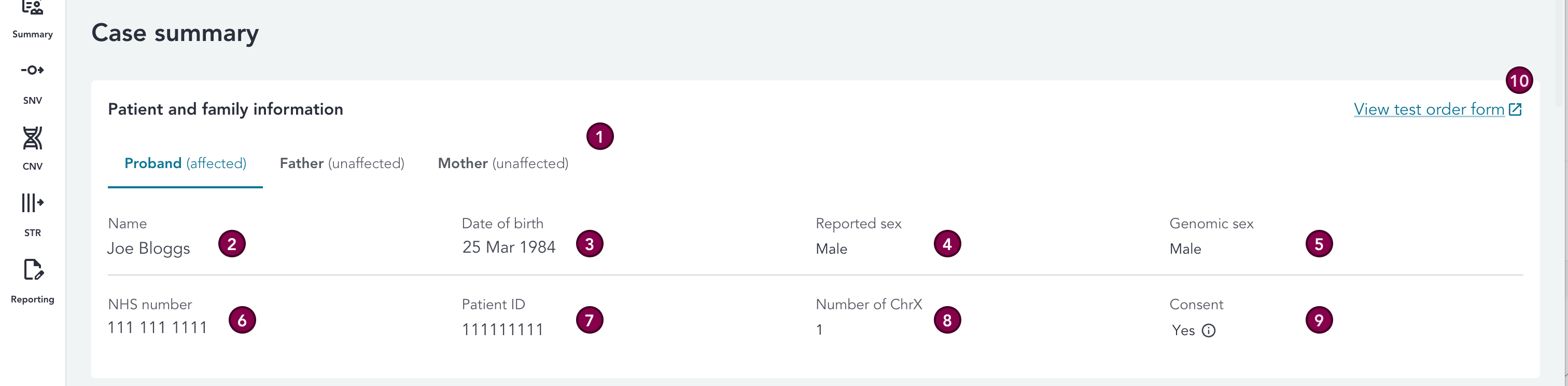
Key
| # | Section | Description |
|---|---|---|
| 1 | Individual / affected status | There is a tab per individual in the case, which also displayes the affected status of the individual (Affected, Unaffected, or Uncertain). |
| 2 | Name | Patient’s first and last name as captured from TOMS. |
| 3 | Date of birth | Patient date of birth as captured from TOMS. |
| 4 | Reported sex | Reported sex as captured from TOMS. |
| 5 | Genomic sex | Patient's genomic sex as reported by the Genomics England Rare Disease pipeline. |
| 6 | NHS number | Patient’s NHS number as captured from TOMS. |
| 7 | Patient ID | The patient’s ID as captured from TOMS. |
| 8 | Number of ChrX | Number of X chromosomes for the family member. |
| 9 | Consent | The patient’s consent status, e.g. Yes or No, as captured from TOMS. Please visit the IP user guide for further details on patient consent. |
| 10 | Test order form | Link to the Health Test Ordering form for the patient. |
Case information
This section contains case-specific details.

Key
| # | Section | Description |
|---|---|---|
| 1 | Test order date | The date the test was ordered. |
| 2 | Analysis issue date | The date the pipeline dispatches the case (sends it to the RDDSS). |
| 3 | Referral priority | Priority for the case, e.g. Routine or Urgent. |
| 4 | Referral ID | The Referral ID for the patient. |
| 5 | Requester organisation | Requesting organisation defined during test ordering. |
| 6 | Interpreting lab | Interpreter organisation defined during test ordering. |
| 7 | Sample source | The source of the sample e.g. blood, saliva. |
Clinical information
This section contains clinical information for the proband.

Keyr
| # | Section | Description |
|---|---|---|
| 1 | Clinical notes | Clinical notes from the Health Test Ordering form, as captured from TOMS. |
| 2 | Clinical indication | Patient's clinical indication. |
| 3 | Penetrance | Penetrance applied to the case when ordering. |
| 4 | Applied GMS PanelApp panels | GMS PanelApp panels applied to the case when ordering, with linkouts to the pages in PanelApp. |
Prioritisation summary
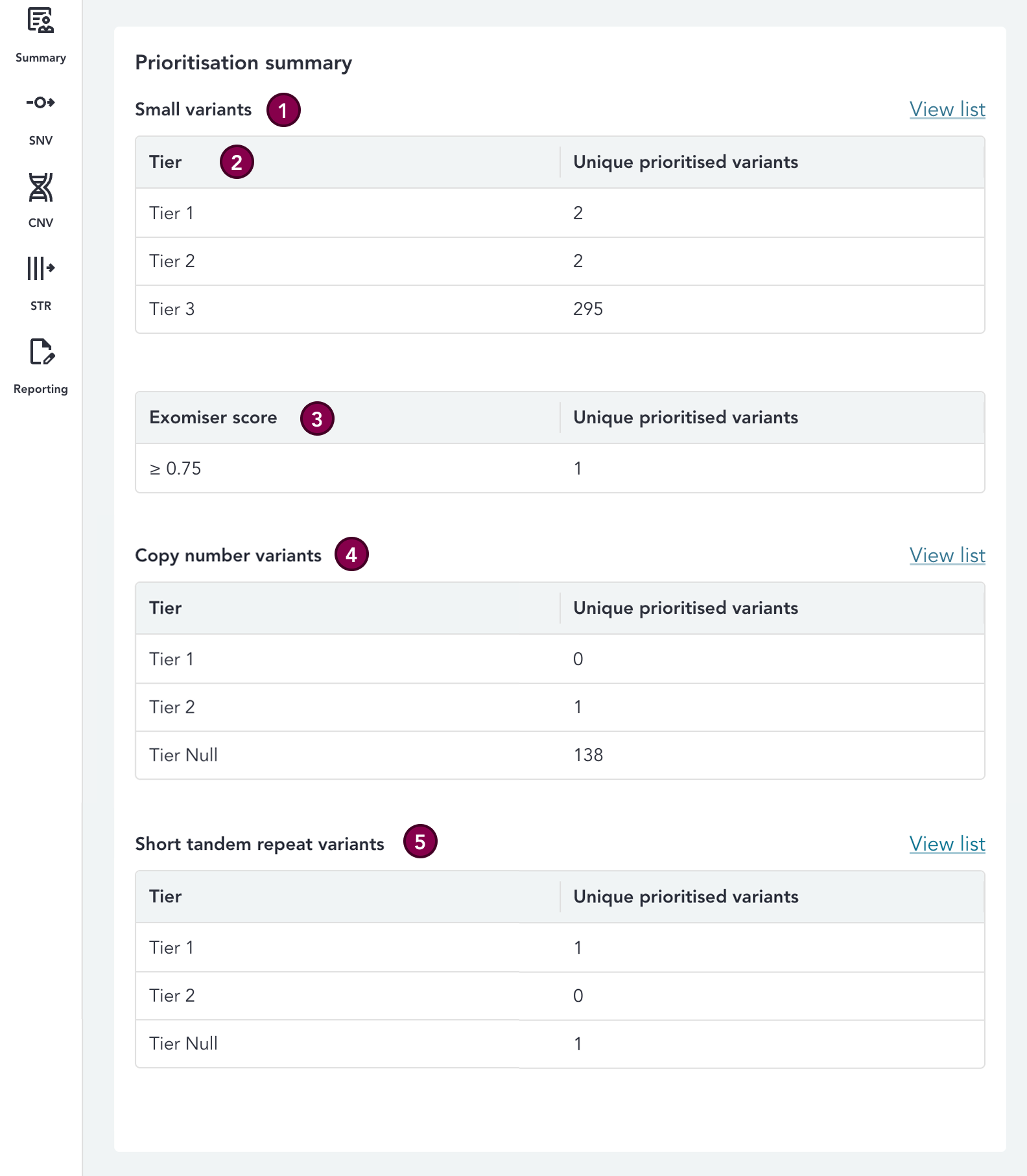
Here, you can see the number of unique prioritised variants by variant type, which is a summary of the Tiered variants identified by the Rare Disease Interpretation pipeline for the case (i.e. it is a count of variants, not a count of all Tiers assigned). There is also a link-out to the variant grid for each variant type, by clicking View List.
Key
| # | Section | Description |
|---|---|---|
| 1 | Small variants | This section contains counts of prioritised small variants. |
| 2 | SNVs - Tier | This is a count of Tiered small variants whose highest Tier corresponds to that Tier. |
| 3 | SNVs - Exomiser score | This is a count of small variants prioritised by Exomiser whose highest Exomiser score is >= 0.75. |
| 4 | CNVs - Tier | This is a count of Tiered CNVs whose highest Tier corresponds to that Tier. |
| 5 | STRs - Tier | This is a count of Tiered STRs whose highest Tier corresponds to that Tier. Where a case has non-PASS STRs that are green in the applied panels, a warning icon is displayed next to this section, with explanation text visible upon hover. |
HPO terms
This section displays the present HPO terms for each individual in the case. The present HPO terms for the proband are always displayed first, followed by headers and HPO terms for other individuals with present HPO terms. Each HPO term has a link-out to its page on the HPO website.
Any individuals with no present terms provided are grouped together, with No HPO terms provided displayed.
Currently, we do not display terms that were marked as absent or unknown in the RDDSS.
Software and dataset versions
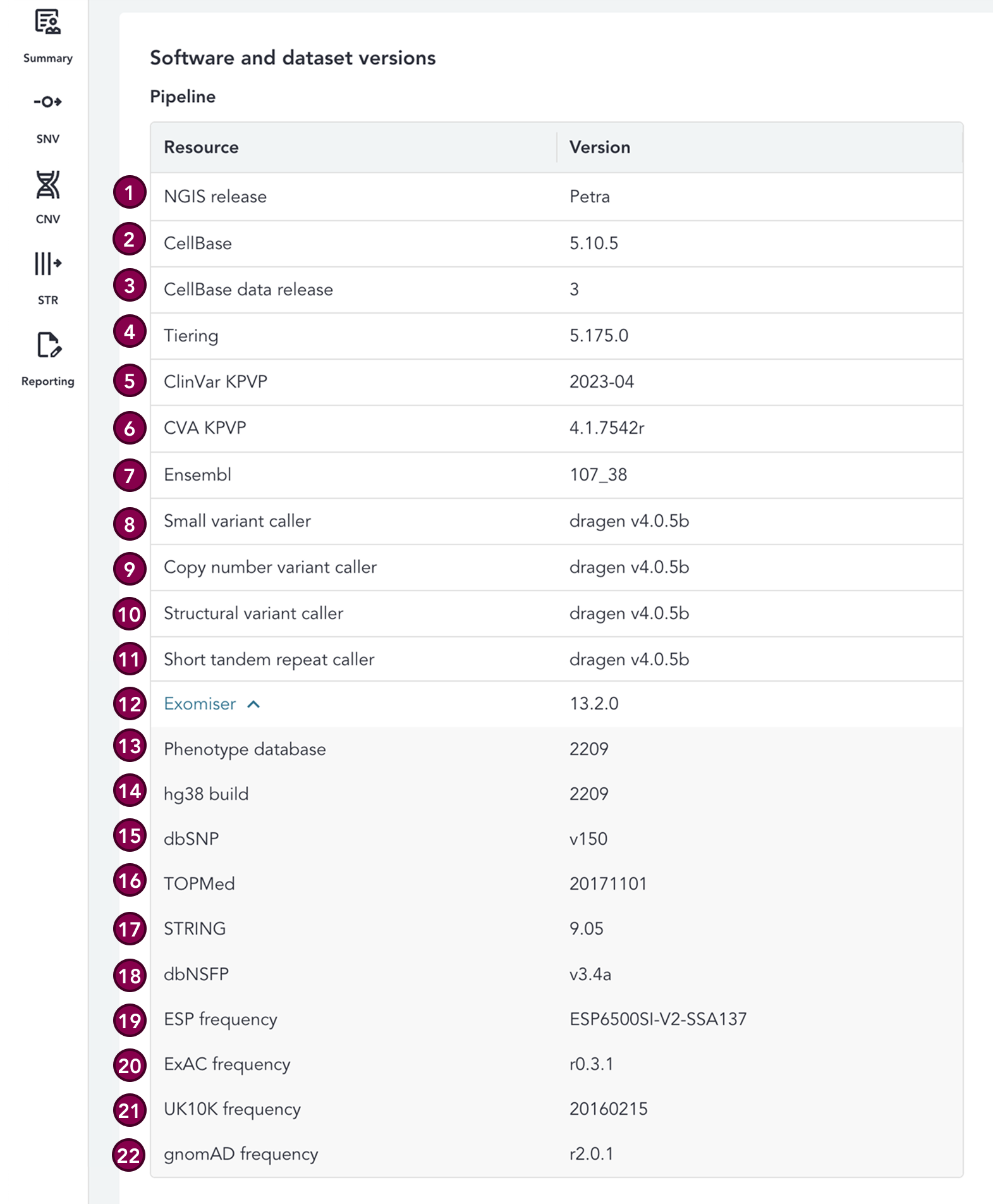
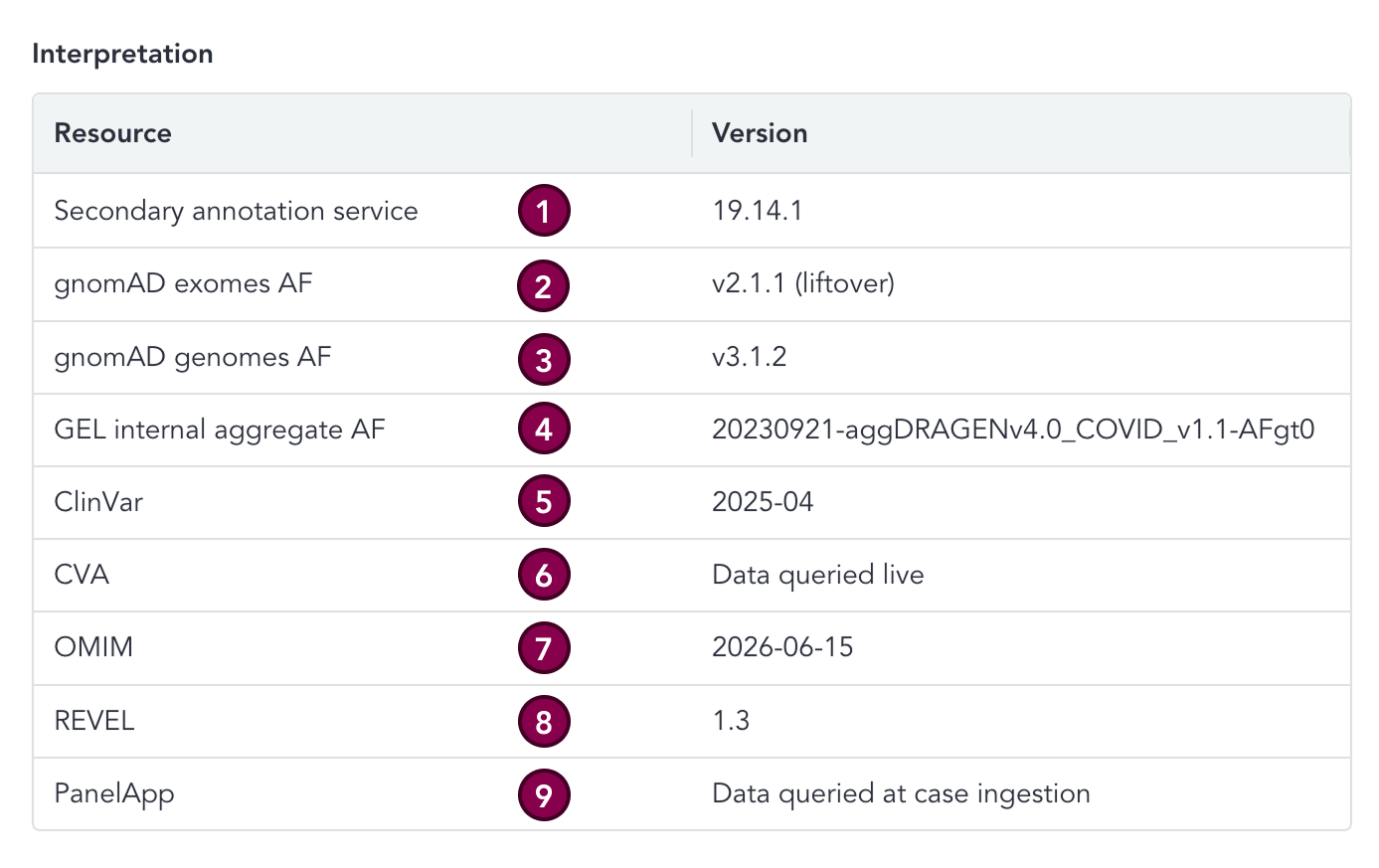
Here, you can find the versions of datasets and software used to process the case. The Pipeline section details the versions of software and datasets used by the pipeline, whilst the Interpretation section details the versions of additional resources provided in the RDDSS to assist with variant interpretation.
For further details on sources of specific variant annotation metadata, please see the annotations page.
N.B. Please note, the below image is for illustration purposes only and does not contain the current software versions being used to annotate your case. You must look at your case within the RDDSS to find the accurate software versions for your case.
Pipeline software versions
Key
| # | Section | Description |
|---|---|---|
| 1 | NGIS release | The Genomics England National Genomic Informatics System release. |
| 2 | CellBase | The version of the CellBase server (i.e. the software itself). CellBase is a data warehouse and open API that stores reference genomic data from public resources such as Ensembl, Clinvar, and Uniprot. |
| 3 | CellBase data release | The version of the data bundle that is stored in CellBase. This is updated less frequently than the CellBase software itself. |
| 4 | Tiering | The Tiering pipeline version used to prioritise the variants into Tiers. For further details see the Tiering algorithm section of the Rare Disease Genome Analysis Guide. |
| 5 | ClinVar KPVP | Version of ClinVar used by Known Pathogenic Variant Prioritisation, an enhancement to the Genomics England Tiering algorithm that can "rescue" known pathogenic variants that previously may have been filtered out by the algorithm. ClinVar is one of the sources of known variants used for this. For further details, see the KPVP section of the Rare Disease Genome Analysis Guide. |
| 6 | CVA KPVP | Version of CVA used by Known Pathogenic Variant Prioritisation, an enhancement to the Genomics England Tiering algorithm that can "rescue" known pathogenic variants that previously may have been filtered out by the algorithm. CVA is one of the sources of known variants used for this. For further details, see the KPVP section of the Rare Disease Genome Analysis Guide. |
| 7 | Ensembl | Version of Ensembl used by the pipeline. |
| 8 | Small variant caller | Small variant caller version used in the pipeline. |
| 9 | Copy number variant caller | Small variant caller version used in the pipeline. |
| 10 | Structural variant caller | Small variant caller version used in the pipeline. |
| 11 | Short tandem repeat caller | Short tandem repeat caller version used in the pipeline. |
| 12 | Exomiser | Version of Exomiser used for prioritisation. For further information, visit the Exomiser page. |
| 13 | Phenotype database (Exomiser) | The Exomiser data release version used, which includes phenotype data. For further information, visit the Exomiser database versions page. |
| 14 | hg38 build (Exomiser) | hg38 build used by Exomiser. |
| 15 | dbSNP (Exomiser) | Version of dbSNP (the Single Nucleotide Polymorphism database) used by Exomiser for variant prioritisation. |
| 16 | TOPMed (Exomiser) | Version of Trans-Omics for Precision Medicine (TOPMed) dataset used by Exomiser. |
| 17 | STRING (Exomiser) | Version of Search Tool for the Retrieval of Interacting Genes/Proteins (STRING) data used by Exomiser. |
| 18 | dbNSFP (Exomiser) | Version of dbNSFP (Polyphen, MutationTaster, SIFT, MVP, REVEL) used by Exomiser. |
| 19 | ESP frequency (Exomiser) | Version of Exome Sequencing Project (ESP) frequency data used by Exomiser. |
| 20 | ExAC frequency (Exomiser) | Version of Exome Aggregation Consortium (ExAC) frequency data used by Exomiser. |
| 21 | UK10K frequency (Exomiser) | Version of UK10K frequency data used by Exomiser. |
| 22 | gnomAD frequency (Exomiser) | Version of gnomAD frequency data used by Exomiser. |
Interpretation software versions
Key
| # | Section | Description |
|---|---|---|
| 1 | Secondary annotation service | This is the pipeline that adds additional annotations to variants after they have been processed by the Genomics England Rare Disease pipeline. |
| 2 | gnomAD exomes AF | The version of gnomAD exomes population frequency data displayed in the RDDSS. |
| 3 | gnomAD genomes AF | The version of the gnomAD genomes population frequency data displayed in the RDDSS. |
| 4 | GEL internal aggregate AF | The version of the Genomics England internal population frequency data displayed in the RDDSS. |
| 5 | ClinVar | The ClinVar data displayed in the RDDSS is a snapshot of the ClinVar database taken at this date. |
| 6 | CVA | CVA data is loaded into the RDDSS when the page is loaded, so the version of this will always be visible in the RDDSS as Data queried live. |
| 7 | OMIM | The OMIM data displayed in the RDDSS is a snapshot of the OMIM database taken at this date. |
| 8 | REVEL | The version of the REVEL dataset displayed in the RDDSS. Where the case was ingested prior to this dataset being added, a warning icon is displayed. |
| 9 | PanelApp | Panel name and version, gene status and gene mode of inheritance. The PanelApp data displayed in the RDDSS is annotated when the case is ingested into the RDDSS. The dataset used for annotation is updated every hour. |
Abbreviations
| Abbreviation | Definition |
|---|---|
| ACGS | Association for Clinical Genomic Science |
| ACMG | American College of Medical Genetics and Genomics |
| CDS | Coding DNA Sequence |
| CIP-API | Genomics England Clinical Interpretation API |
| CNV | Copy Number Variant |
| CVA | Clinical Variant Ark |
| EQ | Exit Questionnaire |
| RDDSS | Rare Disease Decision Support System |
| GEL | Genomics England |
| GMS | Genomic Medicine Service |
| GLH | Genomic Laboratory Hub |
| HGVS | Human Genome Variation Society |
| HTML | Hyper Text Markup Language |
| HSCN | Health and Social Care Network (N3) |
| IGV | Integrative Genomics Viewer |
| IB | Interpretation Browser |
| IP | Interpretation Portal |
| NGIS | National Genomics Informatics System |
| PID | Patient Identifiable Data |
| QC | Quality Control |
| SoF | Summary of Findings |
| SO | Sequence Ontology |
| SNV | Single Nucleotide Variant |
| SV | Structural Variant |
| TOMS | Test Order Management System |
| UAT | User Acceptance Testing |
| VCF | Variant Call Format File |
| VILs | Variant Interpretation Logs |
| WGS | Whole Genome Sequencing |