Rare Disease DSS user guide
Accreditation
The RDDSS is UKAS accredited against ISO 15189:2022 as detailed in Genomics England’s Schedule of Accreditation.
The Rare Disease DSS (RDDSS) can only be accessed by users connected to the HSCN network and using their NHS Smart card. Your credentials will have been set up by the Genomics England Service Desk.
As of version 4.3, the RDDSS allows for the review of all newly processed GMS cases. All cases are dispatched to the RDDSS, in addition to also being dispatched to Congenica (existing processes for Congenica and IP/IB are unchanged).
Disclaimer
The clinical interpretation of referrals and variants should follow your local best practice guidelines.
The RDDSS supports cases with:
- SNVs that were processed since release 4.0
- CNVs that were processed since release 4.2
- Tiered STRs that were processed since release 4.3
Any cases that do not fit these criteria are not supported by the product, therefore it will not be possible to analyse them in the RDDSS, and alternative existing systems should be utilised to analyse the case.
N.B. Tiered CNVs now display as 1/2 instead of A/B. Cases processed by the pipeline prior to the 4.3 RDDSS release will continue to display as Tier A / Tier B instead of Tier 1 / Tier 2.
N.B. Currently non-PASS STRs aren't displayed in the RDDSS, and the STRs displayed in the RDDSS are limited to the loci that are part of the GMS. For further details, please see the product limitations page.
Opening a referral in the RDDSS
Non-compatible cases
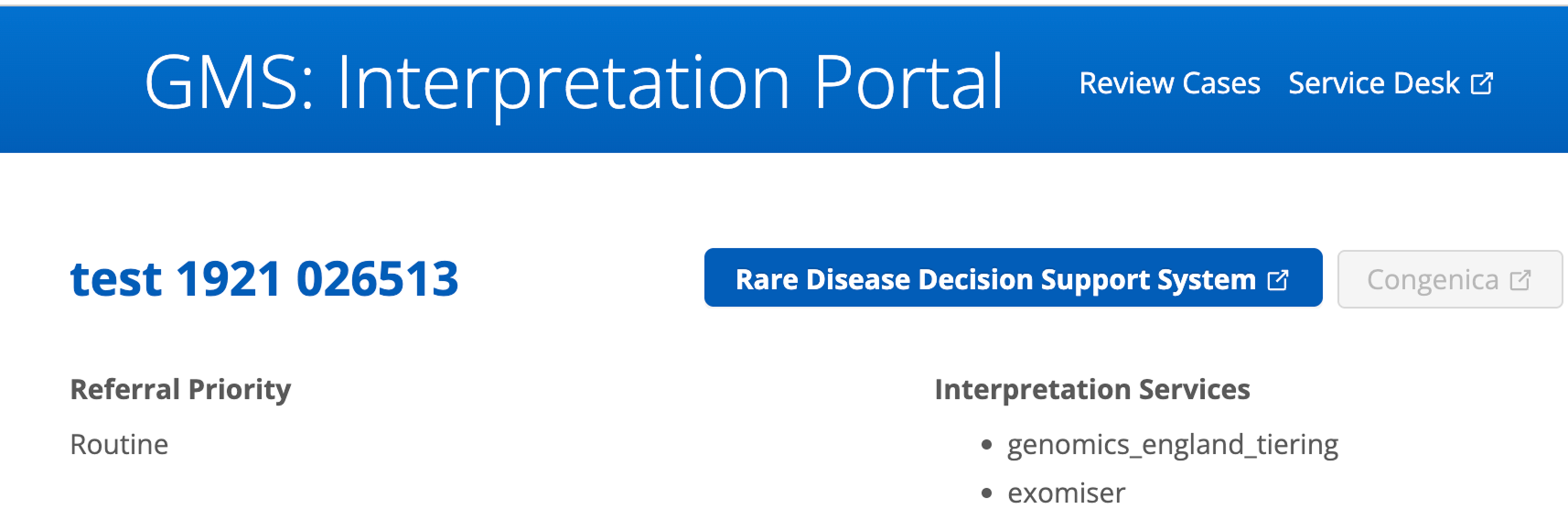
Non-compatible cases will not display a RDDSS workflow status, and the Rare Disease Decision Support System button in the Referral Page will be greyed out. This means the button is non-functional and will not link out to the RDDSS, as the referral does not exist in the RDDSS system.
Your interpretation journey starts in the Interpretation Portal (IP), where the case/referral list is located. To log in to the IP, click the button below and use your credentials:
Access the GMS Interpretation Portal
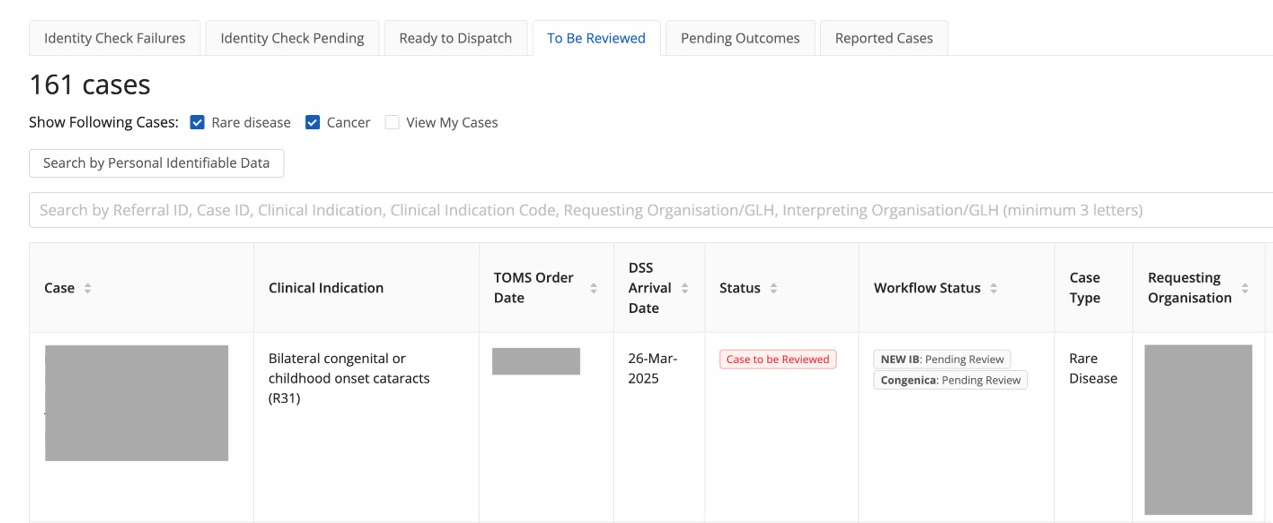
The IP features six tabs, each representing different referral statuses. Within each tab, you will find a referrals grid, which is the primary interface for locating specific referrals. Here, you can select a case to analyse.
Cases that are ready for analysis will be displayed in the To be Reviewed tab, identifiable by their Workflow Status in the referrals grid: "RDDSS: Pending Review" (this workflow status is also visible on the case referral page). For further details on IP integration, including workflow status, please visit the IP integration page.
After clicking on a compatible case, an active Rare Disease Decision Support System button will be visible in the Referral Page. Clicking on this button will open the case summary page for the relevant case in the RDDSS, ready for your interpretation.
The Distributed Whole Genome Sequencing (dWGS) programme is a major transformation initiative led by NHS England and Genomics England to transition whole genome sequencing from a single centralised provider to a distributed network. The programme enables sequencing to be performed locally within commissioned NHS sequencing laboratories while maintaining a centralised bioinformatics, interpretation, quality assurance, and governance framework.
Cases that have been submitted to the centralised and distributed programmes can be differentiated by following sample identifiers.
| Source | Format | Example |
|---|---|---|
| Distributed | s_[a-z0-9]{26} | s_03kjhfjkh23j23nmm34nedskp |
| Centralised | LP[0-9]{7}-DNA_[A01-H12] | LP5000001-DNA_A01 |
These can be checked most easily within the referral page for each case, in the Interpretation Portal. They can also be checked within the RDDSS, by navigating to the details page for a SNV, and looking at the Segregation information card.
For further details on the special considerations for dWGS, please visit the rare disease pipeline user guide.
Site navigation
Navigate between the case summary page, variant grid page, and reporting page using the navigation sidebar. An info overlay is also available, providing linkouts to additional resources (e.g. release notes, roadmap, feedback form, etc). You can view the info overlay by clicking on the Support icon at the bottom of the side navigation.
Side navigation

When viewing a case, the navigation sidebar can be used to navigate to different pages in the RDDSS. For further details on each page, see the key below.
Key
| # | Section | Description |
|---|---|---|
| 1 | Case summary | Navigates to the Case Summary page. |
| 2 | Small variants | Navigates to the Small variants grid. This page can also be navigated to from the case summary page by selecting View list next to the Small variants section in the Prioritisation summary. |
| 3 | Copy number variants | Navigates to the Copy number variants grid. This page can also be navigated to from the case summary page by selecting View list next to the Copy number variants section in the Prioritisation summary. |
| 4 | Short tandem repeat variants | Navigates to the Short tandem repeats variants grid. This page can also be navigated to from the case summary page by selecting View list next to the Short tandem repeat variants section in the Prioritisation summary. |
| 5 | Reporting | Navigates to the Reporting page, where a summary of variants to report, other reviewed variants, and excluded variants is provided, and from where the case can be closed once interpretation has been completed. |
| 6 | Support | Opens an overlay with link-outs to various resources. |
Info overlay
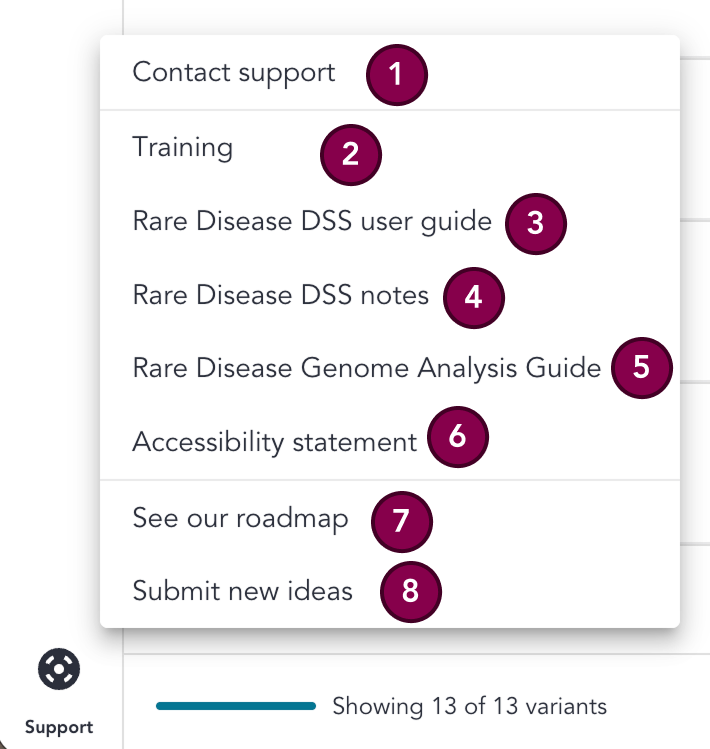
This overlay provides link-outs to various resources. For further details on each resource, see the key below.
Key
| # | Section | Description |
|---|---|---|
| 1 | Contact support | Link-out to Service Desk, where bugs or incidents can be submitted. |
| 2 | Training | Link-out to training resources in the RDDSS help page. |
| 3 | RDDSS user guide | Link-out to the RDDSS user guide. |
| 4 | RDDSS release notes | Link-out to the RDDSS release notes. |
| 5 | Rare Disease Genome Analysis Guide | Link-out to the Rare Disease Genome Analysis Guide, which contains information about the rare disease pipeline. |
| 6 | Accessibility statement | Opens a page which contains the acessibility statement for the RDDSS. |
| 7 | See our roadmap | Links out to details of upcoming features in the RDDSS. |
| 8 | Submit new ideas | This takes you to a page where you can submit ideas for upcoming releases of the RDDSS. |
Abbreviations
| Abbreviation | Definition |
|---|---|
| ACGS | Association for Clinical Genomic Science |
| ACMG | American College of Medical Genetics and Genomics |
| CDS | Coding DNA Sequence |
| CIP-API | Genomics England Clinical Interpretation API |
| CNV | Copy Number Variant |
| CVA | Clinical Variant Ark |
| EQ | Exit Questionnaire |
| RDDSS | Rare Disease Decision Support System |
| GEL | Genomics England |
| GMS | Genomic Medicine Service |
| GLH | Genomic Laboratory Hub |
| HGVS | Human Genome Variation Society |
| HTML | Hyper Text Markup Language |
| HSCN | Health and Social Care Network (N3) |
| IGV | Integrative Genomics Viewer |
| IB | Interpretation Browser |
| IP | Interpretation Portal |
| NGIS | National Genomics Informatics System |
| PID | Patient Identifiable Data |
| QC | Quality Control |
| SoF | Summary of Findings |
| SO | Sequence Ontology |
| SNV | Single Nucleotide Variant |
| SV | Structural Variant |
| TOMS | Test Order Management System |
| UAT | User Acceptance Testing |
| VCF | Variant Call Format File |
| VILs | Variant Interpretation Logs |
| WGS | Whole Genome Sequencing |